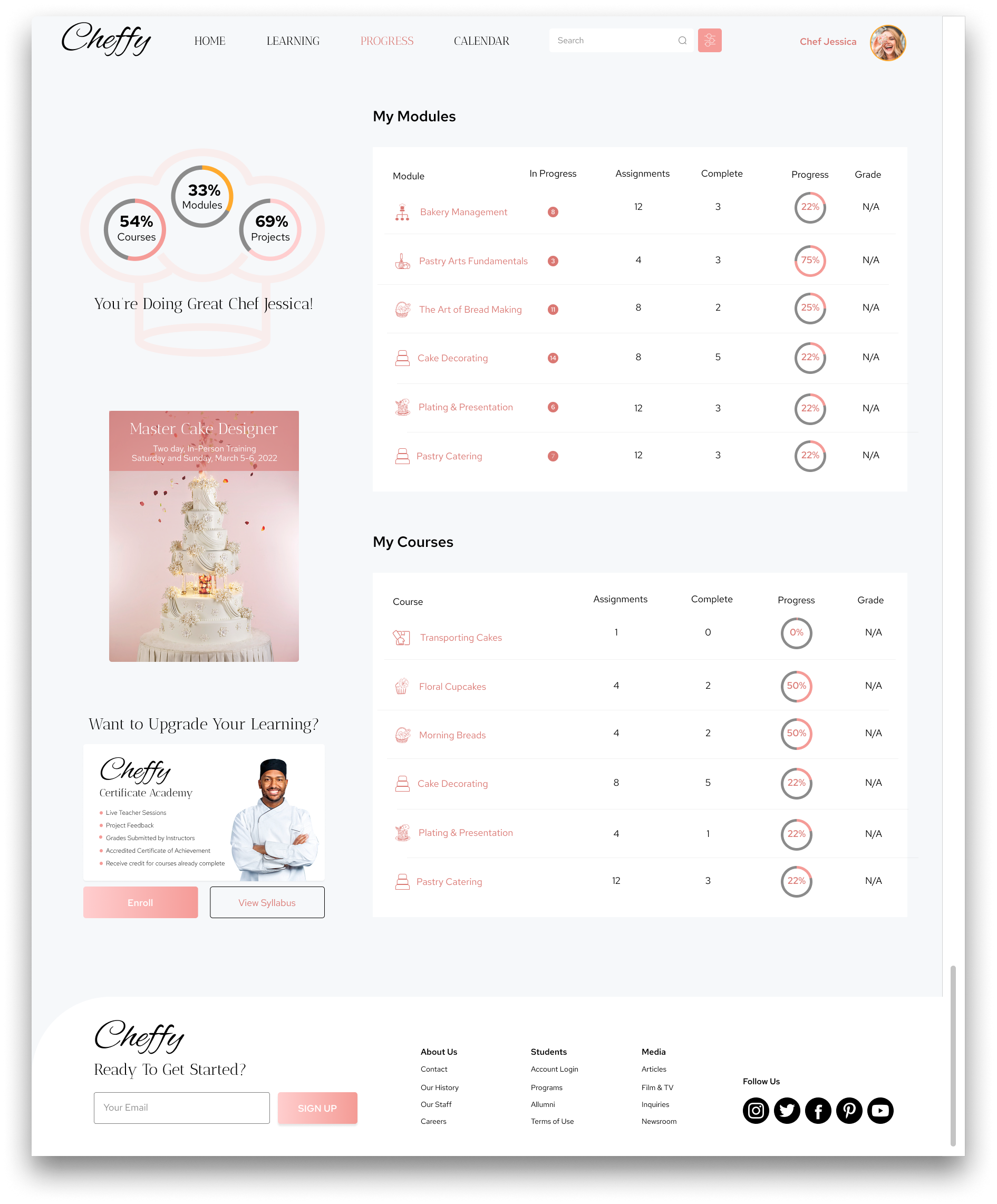
Created an online learning experience for a niche culinary academy that prioritized user-friendly access to courses, and comprehensive learning management tools.


SUMMARY
Utilizing competitive research insights, I embarked on crafting a vibrant and user-centric responsive UI/UX design for an online baking academy. This endeavor aimed to empower users to manage their learning journey seamlessly across both mobile app and desktop platforms.
Drawing inspiration from industry benchmarks, I infused the design with elements of fun and accessibility, ensuring that users could easily navigate through course materials, establish project galleries, and track their progress towards culinary mastery.
ROLES
User Experience
UI Design
Research
TOOLS
Figma
HeyCollab
RESPONSIBILITIES
Competitive Research
Style Guide
Moodboards
High Fidelity Wireframes
Responsive Design
Prototype

CHALLENGE
With the complexity of culinary education, the challenge lies in balancing the need for a user-friendly interface that caters to diverse learning styles. Crafting an online learning app for culinary entails not only presenting engaging content but also integrating features that simulate hands-on experiences and foster community engagement within a digital environment.
SOLUTION
Creating a user-centric e-learning app for an online baking academy involves understanding the unique needs of culinary learners and tailoring the interface accordingly. Incorporating features such as interactive recipe demonstrations, personalized progress tracking, and live events as well as recommendations, fosters engagement for the users. Furthermore, offering seamless access across multiple devices ensures flexibility and convenience, enhancing the overall learning experience for aspiring bakers.
THE PROCESS
1
COMPETITIVE RESEARCH
Conducting competitive research for an online baking academy involves analyzing existing platforms, identifying their strengths and weaknesses, and leveraging insights to design a more compelling and effective learning experience.


2
MOODBOARD
Creating a moodboard to select a color palette that exudes luxury, elegance, and evokes positive feelings involves a deliberate and thoughtful process.
• Curate Visual Elements
• Color Selection
• Foster Creativity
• Evaluate and Refine



3
STYLE GUIDE | UX COMPONENTS
Establishing a style guide and UX components involves creating a comprehensive set of design guidelines and reusable elements to maintain consistency and coherence across the user interface.
This includes defining typography, color schemes, iconography, spacing, and other visual elements. While the style guide is established after moodboarding, the UX components, from atom to page templates, are created during the UX and UI stage of design.


4
USER EXPERIENCE
Crafting UX wireframes for online learning entails envisioning the layout and strategically arranging elements to optimize user interaction, streamline navigation, and enhance functionality, thereby ensuring an engaging and seamless learning experience that adapts smoothly across various devices and platforms.


5
USER INTERFACE
Designing a captivating user interface for an online baking academy involves infusing every click with the joy of baking. With vibrant colors and friendly animations, navigating through recipes and tutorials feels like embarking on a culinary adventure. With intuitive tracking tools and personalized goal-setting features seamlessly integrated, learners can chart their progress with ease, celebrating each milestone on their journey towards mastering the art of baking.
-
![Pink background with the text 'Cheffy Online Baking Academy' and an image of a yellow pastry topped with a cherry, a cookie, white dots, and white icing.]()
Splash
-
![Sign-up page for Cheffy with a form for name, email, and password, and options to sign up with Facebook, Apple, or Google, with a background featuring cakes and strawberries.]()
Sign Up
-
![Mobile app screen with a welcome message, showing a person in the background holding a pink item, and options for learning topics including Personal Enrichment, Improving Professional Skills, and Certificate of Achievement.]()
Onboarding
-
![Mobile app interface with a greeting to Jessica, search bar, a list of recent lessons including piping with buttercream, modules for bakery management, cake decorating, pastry arts fundamentals, and plating and presentation, and a section with cake and flowers suggested for the user.]()
Landing 1 of 2
-
![Mobile app screen showing a course on wedding cakes with a picture of a wedding cake topped with flowers, course details, instructor name, reviews, and options to view module or add to schedule. Featured content includes a live demo by Chef Pierre and a cooking class by Chef Ben with images of a chef decorating a cake and a bakery kitchen.]()
Landing 2 of 2
-
![Mobile app interface named 'My Learning' with a profile picture of a smiling woman at the top right. Features a search bar, settings icon, navigation tabs for Modules, Courses, Projects, and an Assignments section showing 18 assigned and 8 completed tasks. Displayed are cake decoration assignments with images of frosting cakes, including Frosting Cakes, Borderless Frosting, Plating & Presentation, Naked Cake Design, and Fruit Tarts, with details about a specific assignment on a cake presentation.]()
Courses 1 of 2
-
![Mobile app screen showing a gallery of colorful baked goods including cookies, cake slices, cupcakes, macarons, and cheesecakes, with a section recommending wedding cakes with croissants and berries.]()
Courses 2 of 2
-
![Mobile app user profile screen with a smiling woman holding a decorated donut, displaying options such as Enrichment Academy, My Work, Recipes and Notes, and Communication with new message notifications.]()
Account
-
![Mobile app calendar interface showing today's event for a live demo on fresh fruit tarts scheduled for February 20, 2022, at 9:00 AM PST with instructor Chef Suzanne. The calendar highlights February 8 and 15 with colored dots.]()
Calendar